
Check out the code generator and video
tutorial for this hack in my new article:
Custom Meta and Title Tags for Blogger
Since more details are needed about how to add meta descriptions and keywords for each blogger page, I've written a new article on this topic. This is a continuation of the Meta Description for Each Blogger Page article and it's not meant to replace it. Please make sure you read the initial post carefully and follow all the instructions in it to avoid messing up your Blogger template.
blog structure
I won't discuss all the elements in a blog, but the ones we're interested in are the main page and the post pages. Unless you're publishing your blog on a custom domain, the link to the main page looks similar to this one:
http://_something.blogspot.com/Post pages contain the individual articles/posts in your blog and they have permanent links (Blogger calles them "permalinks") which look like this:
http://_something.blogspot.com/2004/03/name.htmlOur aim is to add meta descriptions and keywords for these sort of pages, so we should keep in mind the types of links mentioned above. Remember that what you identify as a post/article or as the homepage is identified by a web browser using the respective link.
code explained
The code you need to use in order to add meta descriptions and keywords is this one:
<b:if cond='data:blog.url == "http://_something.blogspot.com/2004/03/name.html"'> <meta content='DESCRIPTION' name='description'/> <meta content='KEYWORDS' name='keywords'/> </b:if>
Let's look at each line and see what they mean:
The first line expresses a condition: <b:if cond='data:blog.url == "http://_something.blogspot.com/2004/03/name.html"'> This basically says: "if the link (blog.url) that a user is viewing matches (==) a certain link (http://_something.blogspot.com/2004/03/name.html), do...".
The second and third lines are the description and keywords themselves, placed in meta tags. An approximate translation for these two lines would be: "associate this description and these keywords with the current web page".
The fourth and last line ( </b:if> ) ends the conditional statement.
If you connect this code explanation with the conclusion we've reached in the first section, you end up with a phrase that says:
If the page that a user is viewing is the main page or a certain post or article, associate these respective keywords and description to it.
That is exactly what we want to do and it is especially important since we can have a webcrawler (like the Googlebot) instead of a user. Unfortunately however, due to the fact that you can only declare a single "constant" link (http://_something.blogspot.com/2004/03/name.html) in this code batch, you have to repeat the sequence for your main page and for all your other post pages.
where to place it
Here's a screenshot that should explain where to place this code in your template:
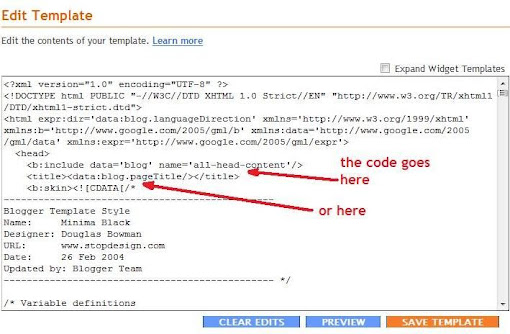
You can place the keywords and description immediately above or below the <title>...</title> line - you choose. If your template looks different than mine, just look for the <title>...</title> line and make room for the code above or beneath it.
example
As a conclusion, we'll look at what you have to in a specific example. Let's say the link to your blog's main or home page is:
http://_something.blogspot.com/We'll also consider that this blog only contains two articles published in February and March, 2008 and that their titles are "My First Post" and "Future Plans". The permanent links (permalinks) to these two post pages will be:
http://_something.blogspot.com/2008/02/my-first-post.htmlhttp://_something.blogspot.com/2008/03/future-plans.html
The code you need to add to your template for the main/homepage and the other two post pages is:
<b:if cond='data:blog.url == "http://_something.blogspot.com/"'>
<meta content='A blog about things I like' name='description'/>
<meta content='my_name,blog,hobby' name='keywords'/>
</b:if>
<b:if cond='data:blog.url == "http://_something.blogspot.com/2008/02/my-first-post.html"'>
<meta content='Why I've started this blog' name='description'/>
<meta content='motivation,blog,first' name='keywords'/>
</b:if>
<b:if cond='data:blog.url == "http://_something.blogspot.com/2008/03/future-plans.html"'>
<meta content='What my plans are' name='description'/>
<meta content='future,plans,travel,vacation,Easter' name='keywords'/>
</b:if>
If you write a third article called "Easter Holiday" and post it in May, its permalink will be:
http://_something.blogspot.com/2008/05/easter-holiday.html... and the updated code from your template will look like this:
<b:if cond='data:blog.url == "http://_something.blogspot.com/"'>
<meta content='A blog about things I like' name='description'/>
<meta content='my_name,blog,hobby' name='keywords'/>
</b:if>
<b:if cond='data:blog.url == "http://_something.blogspot.com/2008/02/my-first-post.html"'>
<meta content='Why I've started this blog' name='description'/>
<meta content='motivation,blog,first' name='keywords'/>
</b:if>
<b:if cond='data:blog.url == "http://_something.blogspot.com/2008/03/future-plans.html"'>
<meta content='What my plans are' name='description'/>
<meta content='future,plans,travel,vacation,Easter' name='keywords'/>
</b:if>
<b:if cond='data:blog.url == "http://_something.blogspot.com/2008/05/easter-holiday.html"'>
<meta content='What I did this Easter' name='description'/>
<meta content='travel,vacation,Easter,eggs,bunny' name='keywords'/>
</b:if>
If a user or webcrawler requests the http://_something.blogspot.com/2008/03/future-plans.html link (your second post page), the first, second and fourth conditions are not matched and the page they see will have only the meta description and keywords you specifically chose for it.
I hope this clarifies the steps you need to follow. Please post your comments and feedback about this explanation.
Related articles:


Thanks, Andrei! That makes it much clearer. So I'm right in thinking that if you have about 90 articles already published, and you folloow these instuctions, your template will be very long, as it will contain 90 sets of different meta tags...?
ReplyDeleteDoes this affect the website load speed at all?
Thanks for taking the time to post this, it was much appreciated.
Hello again. I made the changes for to my template and used a meta-checker website to check the results:(http://www.scrubtheweb.com/cgi-bin/webtools/meta-check.cgi). According to that site, my meta tags for keywords and description are not showing up. Consequently, google takes the description snippet from my navbar! Take a look for yourself at the link above. What do you make of it? Does it matter? Sorry to be such a pain! Best regards, Jaimie
ReplyDeleteHi Jaimie,
ReplyDeleteThe method I use to check my meta tags is to look at the source code of a web page using the "View Source" option in my web browser. I looked at some pages from your site using both my method and the site you mentioned and they all seem to have the same description and keywords. Here are the pages I looked at and their meta content:
http://www.liverpool-kop.com/
http://www.liverpool-kop.com/2008/04/david-moores-feels-let-down-by-hicks.html
http://www.liverpool-kop.com/2008/04/liverpool-arsenal-champions-league.html
http://www.liverpool-kop.com/2008/04/liverpools-greatest-ever-team.html
<meta content='The No 1 Site for Critical Realism about Liverpool FC, focusing on Critical Analysis of Liverpool Players, Liverpool Matches and Liverpool history.' name='description'/>
<meta content='Liverpool Football Club, daily news, message boards, match reports, Liverpool FC, peter crouch, rafael benitez, steven gerrard, anfield, melwood, Bill shankly, football, premiership, Jamie carragher, the reds, fussball, futbol, calcio, English football, Scottish football, Liverpool fixtures, Liverpool results, Fernando torres, kenny dalglish, bob paisley, xabi alonso, kevin keegan, champions league, Liverpool history' name='keywords'/>
Again, these tags appear using both the "View Source" option and the meta analyser site.
Please give me some examples of links from your site for which you added the code and also the code itself you wrote - maybe I wasn't looking at the right pages.
I also used the analyser for a couple of pages from my site:
http://andreiaga.blogspot.com/2008/03/meta-description-for-each-blogger-page.html
... has the following meta content:
<meta content='meta description and keywords for each blogger page' name='description'/>
<meta content='SEO, meta, description, keyword, keywords, blogger, web, page, code, condition, tag' name='keywords'/>
http://andreiaga.blogspot.com/2008/04/meta-description-more-detailed.html
... has the following meta content:
<meta content='A continuation of the "Meta Description for Each Blogger Page" article' name='description'/>
<meta content='SEO, meta, description, keyword, keywords, blogger, web, page, code, condition, tag, detail, explanation, details' name='keywords'/>
As you can see, these two are different, which means the meta analyser site shows correct data and the code works.
About your first question, you can add (theoretically) 90 sequences of code for your articles. The current description and keywords of your site have 147+420 characters. We can round that up to 600 characters. Each character is stored on one byte in the ANSI encoding, so the whole batch will have roughly 600 bytes. 90 times 600 is 54000. A KiloByte has 1024 bytes, which means those 54000 bytes are equal to 54000/1024 = 52,73 KiloBytes (KB). That's approximately 53KB and your "michael thomas liverpool bursting" page has 96KB. You can have even larger pages loading very fast, so 90 sequences of (rather long) meta descriptions won't make a big difference.
However, the code you need to add (those <b:if cond...> tags) are executed server-side. This means the server interprets them first and only sends out the meta tags for the only true condition. A visitor will therefore be receiving one web page plus 600 bytes of added meta content.
Moreover, if I were you, I wouldn't bother writing descriptions for the articles you've already posted. I'd chose 10 important ones and write descriptions for those and then add new meta content for the articles I'd write from there on.
I'm looking forward to your reply and I hope this explains the load speed issue.
Cheers,
/andrei_aga
Hi Andrei. Thanks for replying. I've inmplemented the code for the following three pages:
ReplyDeletehttp://www.liverpool-kop.com (homepage)
http://www.liverpool-kop.com/2008/04/david-moores-feels-let-down-by-hicks.html
http://www.liverpool-kop.com/2008/04/liverpool-arsenal-champions-league.html
I tried the meta-tag analyser and the tags show up fine on the two articles. They don't seem to be working on the homepage though. When I check using http://www.scrubtheweb.com/cgi-bin/webtools/meta-check.cgi, it tells me that the tags are not working properly.
On a separate note, is there anyway to have the post title before the blog title when the post shows up in search engine results? Every search engine results starts with: Liverpool-Kop...then the post title...
Why do Blogger make things so difficult! What makes it worse is Google owns blogger yet makes SEO rdiculously difficult.
Thanks for your continued advice :-) Jaimie
Hi again Andrei - my website disappeared a few hours after inserting the code! I kept getting 404 errors, so I uoloaded the old template and it came back again.
ReplyDeleteI emailed you the template with your code that I inserted. if you get time, have a look...tell me what you think went wrong. Only if you have time of course.
Thanks again :-)
Jaimie
This code is now working on Jaimie's http://www.liverpool-kop.com/
ReplyDeletethanks!!! When Error 404 appeared, i thought i've messed up everything, but recover with backup template and applied the codes, and the meta tags live!
ReplyDeleteAn excellent article that has been very helpful and I hope to implement soon.
ReplyDeleteWould you mind just clarifying one thing please Andrei ?
If I use this approach and I only add meta descriptions for say 10 pages, what happens with the remaining pages ? Do they then not have a meta description at all or do they default to the "home" page meta tags ?
Thanks for your help,
Sigmar
Sorry Andrei,
ReplyDeleteI have one further small question. Do I have to use the blog post title (finishing .html) or can a use a folder name, ie a search label such as :- "http://battlereporter.blogspot.com/search/label/-%20Dwarfs" ?
If I can use the search label will all of the posts under that label have the same meta keywords and description ?
Thannks very much for your post, people like yourself in the blogging community are a huge help for beginners like me.
All the best,
Sigmar
Hi Sigmar,
ReplyDeleteSorry I couldn't reply sooner. Here's my answer:
By default Blogger blogs don't have meta descriptions for their post pages. So if you only add the code for 10 pages, those 10 pages will have these meta tags and the remaining others won't have descriptions at all.
You can use the code to add meta descriptions for a certan label such as http://andreiaga.blogspot.com/search/label/Blogger (this is an example from my blog). However, the description will only apply to the index page that contains all the posts marked with that label and it won't apply to the individual post pages. In other words, let's say you have "Article 1", "Article 2" and "Article 3", all marked with a label called "Articles". When a user clicks the link for this label, he'll get a page with three articles on it and this page will have the meta description you want. However, if the user clicks the link to "Article 1" (for example), the post page that appears will not have a meta description.
The code is indeed less than perfect and you made a good point with these questions. I am however working on a more elaborate version of this hack and I'll post more instructions soon.
Thank's for your comments and please let me know how this works out.
Cheers,
/andrei_aga
Thank you kindly for the reply Andrei. You have been exceptionaly helpful to both me and, I see, the previous posters.
ReplyDeleteYou have given me some ideas. I need to see if any particular labels are picked up by google more often than others. If so, I might just apply the different meta tag logic to those pages. Or I might just select say 10 of the best posts and have different descriptions for those, like to suggested to a previous poster.
Thanks again for your help,
Sigmar
Sorry again Andrei, one last thought...
ReplyDeleteis it possible to use a wildcard after the label to pick up all posts within the label ? Eg...
http://andreiaga.blogspot.com/search/label/Blogger/*.html
Thanks again,
Sigmar
Hello Sigmar,
ReplyDeleteI tried to use the wildcard on a test blog and I'm afraid it doesn't work.
In the "head" section of your template you can only use globally available data and data tags for labels are only available locally (they can only be used within the "post" section or in certain widgets). There is a workaround you can use and it implies creating a widget within the "head" section. However, it doesn't quite achieve the result you're after and moreover, it messes up the "Page Elements" section in Blogger's Layout tab.
/andrei_aga
Thanks so much for all your work, Andrei!
ReplyDeleteI was able to get this to work on my regular blogger hosted blog, but I also have a blog which is hosted on a custom domain through blogger.
Could you please explain how the code would be changed for this situition?
Thanks again!
Lisa
Hi Lisa,
ReplyDeleteBlogger blogs may use the old classic templates or new templates with layouts.
If your other blog has a classic template, you won't be able to use the meta description hack on it (at least I never tried it and I'm pretty sure it doesn't work). However, if the blog has a new template (with layouts) you simply have to implement the code the same way you'd do for a regular blog. The only difference is that while blogs hosted on BlogSpot have permalinks that start with "http://_something.blogspot.com", those hosted on a custom domain have permalinks that just start with "http://_something.com". In other words, they'll have domain URLs instead of subdomain URLs.
Now, from what I know blogs published on an external server (usually via FTP) have to use classic templates. However, from what you said I'm not sure if your blog is published on such an external sever or it's still on a BlogSpot server and just has a custom URL. If the latter is true, it's most likely that your blog uses a new template and you can implement the hack by simply following the instructions above (no special changes are needed).
Let me know if I undertood the question corectly and if this answers it.
Cheers,
/andrei_aga
Andrei,
ReplyDeleteI'm not sure how blogger hosts a custom domain through them or whether or not I am using a classic template.
I tried your instructions on a regular blog and had no problems, but when I tried to change the html on the custom domain it would not work.
I thought it might have something to do with this part of the code:
"data:blog.url"
since my custom domain is http://_something.com.
Have I explained my situation any clearer?
Thanks again!
Lisa
Hmm... let's do this: you tell me the link to your blog and I'll create custom meta descriptions for two or three of your post pages. If that doesn't work on your other blog, it will mean that it's using a classic template and this hack is simply incompatible.
ReplyDeleteIf, for any reason, you don't want to post your blog URL in a comment on this blog, please mail me at andrei_aga [at] yahoo.co.uk.
Looking forward to your reply.
/andrei_aga
Thanks Andrei for all your work.
ReplyDeleteI was wondering if someone could make a widget, gadget or macro that would make it easy to make this code each time and would tell you in real time keyword density and character length....then after you hit submit it spits the proper code out highlighted and ready to paste.
I could maybe experiment with imacros but don;t know the first thing about making widgets or gadgets.
Had a related topic question:
RE: Title swap. Is it better to use the code that removes the Blog title on all pages except the main page? This way you don't have the duplication factor within each post title depending upon the length of the post title.
CJ
your posts is very helpful however i have onde doubt. IF in the forntpage(main page) we have meta content, it's possible to had metatags for subpages? It won't override or cause instability?
ReplyDeleteThanks.
Hi Andrei
ReplyDeleteI Tried what you told.My blog is
http://smallworkarounds.blogspot.com.I am using a template in there.I have wasted my time and written exactly the same way for each of my 42 posts but to my surprise when i inserted them to my template its changing doble quotes just after the ==in cond to " i think this is causing problem please see my blog and do help me and tell me if i am doing something wrong.
Here i have pasted what i have made please do reply soon.
b:if cond='data:blog.url =="http://smallworkarounds.blogspot.com/2008/10/windows-live-writer-portable_26.html"'
meta content='Tells you about latest Windows Live Writer Portable.WLW is an amazing bloggin platform from which you can publish any of your blogs either on Wordpress,AspAdvice,Blogger,Typepad,BlogEngine.Net' name='description'
meta content='WLW,Windows_Live_Writer' name='keywords'
b:if
I have removed angular brackets or opening or closing tags just because they were not being accepted in your comments although i have put them when i tried injecting it into my blog
This i have pasted just above the title and nothing is getting downloaded when i do view source only the meta tags which google webmaster and some other sites have injected to test the originality are getting downloaded.
My email is mailto:ash143gupta@gmail.com
Hello Aashish,
ReplyDeleteTry using the code in this text file. It's basically the same as yours, except that I replaced the double quotes with corresponding HTML entities. Since this code is in a plain text file, you shouldn't have any problems with it.
Please let me know if it works or if you need more help.
Cheers,
/andrei_aga
Thanks Anderi for your quick reply i have already tried that rather i should tell you that if your write double quotes in blogger edit template it automatically converts it to " but with this nothing is coming on pages metatag content you can check my blogs meta tags.There are already a few coming by default are they causing the problem.I dont know why my meta tags are not being displayed using your code snippet although it seems that i am doing everything correct.It would be very nice of you If you could please look into the matter.
ReplyDeleteThanks again
Hello Andrei Sorry to bother you again but i dont know how,but now my meta tags are working.I haven't done anything special now just replaced "" with their html counterparts which i was doing a day before also but it was not working but surely today its working.Thanks for all your help man you rock.Keep the good work going.If i have a doubt again i will again bother you.You are really doing a good job.
ReplyDeleteThanks
Hi Aashish,
ReplyDeleteYou don't know how glad I am to hear that :D I looked at your blog earlier today and couldn't see anything wrong with your existing meta tags. I was going to ask you to send your template by email, but now that the hack is working I can put my mind ar ease :)
Thanks for the comments and don't hesitate to contact me if there's anything you want to discuss.
Cheers,
/andrei_aga
Hi Andrei- I put the code with my own keyword/blog url & description, but its giving me xml parsing error.. What should I do now? I copied the code from this blog & paste it onto notepad to make sure its done right. But so far it keeps giving me the same error.
ReplyDeleteCan you help me out?
Mottobiz
Hi Mottobiz,
ReplyDeleteTry using the code in this file: http://andrei.agavriloaiei.googlepages.com/code.txt. It also contains a hack for switching post titles with blog titles for post pages - if you don't need that, simply erase the first condition.
Let me know if this helps.
Cheers,
andrei_aga
Howdy Andrei,
ReplyDeleteThanks for your timely help. However I got the same xml parsing error, even after implementing the text code.
Can I email you the code that I have pasted? So you cancheck for any errors..
I truly appreciate your help with this problem.
God Bless,
Mottobiz
Yes, please do. Also, could you copy/paste or make a screenshot of the exact error message for me?
ReplyDeleteThanks,
/andrei_aga
Howdy Andrei-
ReplyDeleteHope you are doing well. I have sent you an email with the exact error message & also the code that pertains to my main blog url & post url.
Look forward to hear from you soon.
Thanks a ton,
Mottobiz
Hmm... Are you sure? My email address ends in yahoo.co.uk - it's andrei_aga[at]yahoo.co.uk and you need to replace [at] with the "@" sign. I looked in the Inbox and the Spam folder and there aren't any emails from you :(
ReplyDeleteHowdy Andrei,
ReplyDeleteYou are awesome! It worked perfectly after your coding suggestion. You are nothing less than a genius. Thank you very much & I look forward to read more posts from you.
Mottobiz
A.K.A- Chetan
Thank you Chetan! I only wish I had more time and inspiration to post more often - I promise I'll do my best, though ;)
ReplyDeletethank u so much Andrei.... i followed your instruction and working fine for me.... i'm still observing the results. cause 2 post indexed in google in 2 different way after this. in the first one google took the description form the meta tag, but in the second it didn't.
ReplyDeleteimplementing the solution was a bit annoying cause i had to write 90 meta tags for my 90 posts. but i did it.
one last thing... as google have already indexed my older pages with the older static meta tag generating duplicate description, is there any way to reindex them all?
Wow! 90 posts... I'm sorry you had to go through that :( Make sure you get back to check out a faster method I'm working on. It'll probably be ready in a week or two.
ReplyDeleteAbout your question: you could try a service like "pingomatic.com". However, tools like these only notify Google that your blog has changed. I don't know any methods to "persuade" search engines to reindex your pages. They will reindex them in time and you just have to be patient.
Congratulations for the cool template on your blog and good luck to you :)
/andrei_aga
oh... that's great news that u r working on a faster method. i'll love to try that also.
ReplyDeleteabout the reindex, the google seems to be very reluctant to do that.
i've mailed u about a problem i'm facing with your tags. it indexes the pages in a multiple way. i'm scared of google punishing me with a lower page rank for having similar entries. it already shows the following line in my search results
In order to show you the most relevant results, we have omitted some entries very similar to the 93 already displayed.
If you like, you can repeat the search with the omitted results included.
how can i get rid of this line?? can u suggest anything??
thank u for complementing my blog :)
hi Andrei, here's an update... i forgot to add the meta for my latest post before google crawled. but google indexed the page with the first para of the post as the description. i would have also used the first para as meta description as i did for early posts. so.. what's the point in adding the meta tag?? i think i should only use the meta 'if condition' for the homepage meta... and leave the rests.. google will automatically index it with the first para as description. what do say??
ReplyDeletebtw... a good news is.. my site is being crawled atleast once in every 24 hrs. i think that's a very good crawl rate for a new site.
Hi Sazid,
ReplyDeletePlease find an answer to your questions in my reply email.
The one thing I need to mention here is that the code for the homepage has to use the "data:blog.homepageUrl" datum instead of the actual URL. I'll fix this issue or explain more in my next article on this topic.
/andrei_aga
Hi there,
ReplyDeleteHow are things going? Hope all is well. I know you've helped me in the past about my meta tags for one of my other blogs I have.
I was wondering if you could check my source code for one blog I recently changed to see if I did it right.
www.YourGuideToInternetMarketing.net
I changed it and published a new post for changes to take effect but it is still showing my blog title in Search Results rather then the blog post in which I like.
I followed the directions you gave me in the past but doesn't seem to be working in my latest post I made.
Please look at my source code and let me know if all is right.
Thanks,
Jamie Boyle
Making Money For Life
Hi Jamie,
ReplyDeleteAll your post pages use the post title as page title, so everything appears to be working fine.
I did a "site:www.yourguidetointernetmarketing.net" query on Google to look at how your pages were indexed and although most of them are still indexed with the blog title first, there's one post (How To Increase Blog Traffic) indexed with its own title. I think there was one more yesterday - the one called "Blogs may not be hosted at naked domains" - but today I can't see it in the index any more. Don't worry about that, it will probably be included again shortly.
The conclusion is that you've applied the hack correctly and Google has already indexed some of your pages as you want them. So it won't take long before all your pages will show up with the article title.
Cheers,
/andrei_aga
Thanks for checking into it! I noticed that the other day too that they are starting to appear in the search engines as the Post Title. Glad to see!
ReplyDeleteThanks for taking the time on checking to see if I applied the hack correctly. Much apreciated.
Great job on the new tool you've create so people can get the code for meta tags and title tags from your blog. People will love that.
Keep up the great work!
Sincerely,
Jamie Boyle
Making Money For Life
Thank you very much to give us such great video tutorial. It is very helpful to customize meta description and keyword in blogspot.But Till now I don't have the benefit of customizing meta description and keyword for each post page.Now help me please what should I do?
ReplyDeleteOh yes ,in Thursday, February 12, 2009 video tutorial at the end you said that in next you will show how to snippet the link ,search engine bot that is helpful for us.
Please help me ,I can not understand how search engine bot my blog
My site:http://www.celebratezone.blogspot.com
My Email:seogurum@gmail.com
Hi seogurum,
ReplyDeleteI looked at your http://technorise.blogspot.com/ blog and you have implemented the code correctly for the homepage. Now you need to do the same for at least some of your post pages. As an example, here are the exact steps for your latest article (Nokia N95 can be your best online gambling phone):
1. Select the value "1" at Step 1.
2. Select "No" at Step 2 and 3.
3. At Step 5, fill in the URL field with the permalink for the post page: http://technorise.blogspot.com/2009/05/nokia-n95-can-be-your-best-online.html
4. Fill in the other two fields with your description and keywords.
5. Click "Get the code" and place the generated code into the HTML source of your blog, over the commented line specified the the tutorial.
Good luck and let me know if you need more help.
Cheers,
/andrei_aga
hi, dude i am just want to know that i have changed my blog address today not own domain name but blogpspot to blogspot and i want to know whether i need to verify my blog again and submit to google search engine..
ReplyDeleteAlso let me knonw whether google identifies my changes or not....need your info very urgently
Hi Ramesh,
ReplyDeleteYou do need to submit the site again and create a new profile in your Google Webmaster Tools. Read this article and make sure you follow all the guidelines that apply: http://googlewebmastercentral.blogspot.com/2008/04/best-practices-when-moving-your-site.html
Let me know if you need more help.
Cheers,
/andrei_aga
Hi,
ReplyDeleteI really want to know how you got rid of blogspot at the end of your address.
How did you make it www.agawebs.com instead of the default www.agawebs.blogspot.com
Please tell me at eadvice_health@hotmail.co.uk
Thanks, love your site
So this means that the meta data added for a post page will include (when read by the crawler) the meta tags for the main page as well as the post page whereas a post page with no additional meta tags will only read the main page meta data?
ReplyDeleteHey Ryan,
ReplyDeleteNot really... that's not quite what it means. Go ahead and watch this video. It should explain things better.
Cheers,
/andrei_aga
Hi Andrei,
ReplyDeleteThanks for putting this article. This is good stuff lol. However, I did try it putting these lines of codes:
xxxb:if cond='data:blog.url == "http://topvacationgetaways.blogspot.com"'>
xxxmeta content='Ideas and recommendations for your vacation getaways along with best reviewed hotels and restaurants' name='description'/>
xxxmeta content='top vacation getaways' name='keywords'/>
xxx/b:if>"
xxxb:if cond='data:blog.url == "http://topvacationgetaways.blogspot.com/2011/01/sanur-beach-bali.html"'>
xxxmeta content='Complete reviews and information about Sanur Bali Beach' name='description'/>
xxxmeta content='Sanur Bali Beach, Bali Beach, Sanur Bali, Sanur Beach' name='keywords'/>
xxx/b:if>"
Replace xxx with <
For some reason when i open the view source code, the main index page, it did not show up at all, but the second page it works fine... I dont know why it did not work for me but for others here it seems working fine.
So what I did I change the code instead of using URL page, I used the page title. Now it seems it is working fine.
Here is my side: http://topvacationgetaways.blogspot.com/
I am a beginner, please give me some advices what else need to be tweak for SEO part. Thanks.
Cheers...
This article was deeply informative; for the longest time I had visited other SEO-oriented blogs to try and get separate meta tags rendered correctly for each of my Blogger Pages. The spiders "refused" to crawl my site appropriately. Finally I stumbled on what I was doing wrong by seeing your instructions; I was using PageType instead of Homepag.url.
ReplyDeleteThanks!
cybertron-transformers.blogspot.com
Hi Andrei,
ReplyDeleteLong time no see! Howz life? Hope you are in best of health.
I was wondering if it is possible to link or 'call' a text file with all meta tags code inside it. The file can be hosted somewhere other than blogger (third party like fileave,dropbox etc) since we are not allowed to host any files on blogger.
When I say link or Call, I am referring to .js or jquery files (externally hosted) that are called up through a text/java script. Can we duplicate this process to call up meta tags code file... This way the blogger template is not bloated with excessive code. If someone has more than 100 posts, then all the meta tags code will eat up a lot of space within the template of blogger.
Do you think the above idea is possible at all?
Take Care,
Chetan
Hi Chetan,
ReplyDeleteYour comment is indeed a pleasant surprise.
I can see why you would want to keep things modular and it would make sense to have the descriptions in a separate file. However, you could only do this with JavaScript and the effect would not be noticed by search engine crawlers. So as far as I can tell, this technique isn't feasible.
I'm really glad we got back in touch and I hope to hear more from you soon.
Take care and have fun.
Cheers,
/andrei_aga
Greetings Andrei,
ReplyDeleteReally glad to hear back from you. I do hope we can re-connect again & share some insights.
I love how you have redesigned your site by providing helpful & intelligent content. Best of my wishes to you.
Take care
Thanks Andrei. Highly appreciate your detailed post on meta description for individual posts. I can now finally update my site.
ReplyDeletehello Andrei sir i have written around 200 post and did not use meta tag till now how i optimize meta tag for all as google allow only 150 words in description and 200 word in keyword. please help me how can i generate meta tag and key word for a ll 200 pages and add to it my template thank you in advance..my url is http://www.thetechface.com and my mail id is vivek200722@gmail.com
ReplyDeletehello Andrei sir i have written around 200 post and did not use meta tag till now how i optimize meta tag for all as google allow only 150 words in description and 200 word in keyword. please help me how can i generate meta tag and key word for a ll 200 pages and add to it my template thank you in advance..my url is http://www.thetechface.com and my mail id is vivek200722@gmail.com
ReplyDeleteHelo andrei this very good and informative article i am searching for ths type of post and seo from last 3 months but i was unable to find .can you pleaSe give me my meta tags .my blog is http://careerandtricks.blogspot.com .thanx in advance because i know you help everyone.so the same i except.please dont let me down.look forword for your reply.thanx again
ReplyDelete